


Visual Paradigm QueryBase operates as a native cloud-querying service built directly on top of the Visual Paradigm Cloud Workspace. Understanding how QueryBase bridges your desktop modeling environment with cloud data repositories ensures seamless collaboration and accurate data extraction across your team.
Architecture & Data Flow
The connection between Visual Paradigm Desktop, Cloud Workspace, and QueryBase forms a unified modeling and data-mining lifecycle:- Authoring (Visual Paradigm Desktop): Architects and designers create, modify, and manage models (UML, BPMN, ERD, ArchiMate, Use Cases) using Visual Paradigm Desktop.
- Synchronization (Cloud Workspace): When project updates are committed to the Visual Paradigm Cloud Workspace repository, the structured model definitions—including diagram layouts, element stereotypes, custom attributes, and inter-element relationships—are securely stored in the cloud.
- Indexing & Mining (QueryBase Engine): QueryBase directly accesses this centralized cloud repository. It parses project structures dynamically, allowing users to browse, search, construct hierarchical queries, and execute chained model queries in real time through any web browser.
Key Advantages of Cloud Integration
Connecting QueryBase directly to the Visual Paradigm Cloud Workspace offers several technical and operational advantages:- Always Up-to-Date Model Data: QueryBase queries reflect the latest project state committed to your cloud workspace, eliminating stale documentation and outdated static report exports.
- Zero-Client Footprint for Stakeholders: Project reviewers, software engineers, QA teams, and business analysts can query and extract complete model metadata without requiring a local Visual Paradigm Desktop installation or local project file downloads.
- Centralized Access Control: Because QueryBase relies on your Visual Paradigm Cloud Workspace environment, project visibility, user roles, and data security are governed centrally using your existing cloud permissions.
- Optimized API & Web Execution: Heavy graph traversal and hierarchical property extraction are processed in the cloud, delivering high performance even for large-scale enterprise models.
Activating QueryBase Step-by-Step
Accessing your cloud projects within QueryBase requires activating the QueryBase service on Visual Paradigm Online. To activate QueryBase, make sure:- Your project is hosted in Visual Paradigm Online (not a local or offline project)
- You have sufficient permissions (e.g., project manager)
- Your team has a valid license for QueryBase
- You’ve already created your Visual Paradigm Online account and joined your workspace
- Open your browser and log in to your Visual Paradigm Online account at: https://online.visual-paradigm.com/login.jsp
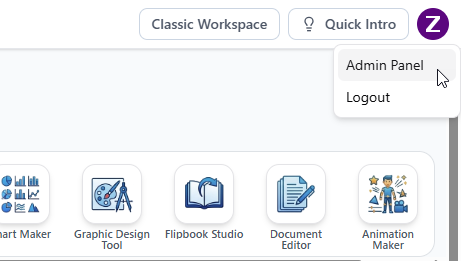
- You’ll be redirected to the Visual Paradigm Unified Platform. Click your logo at the top right corner and select Admin Panel.
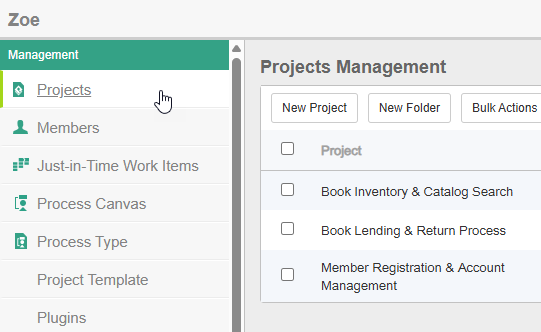
- Click on the Projects menu on the left.
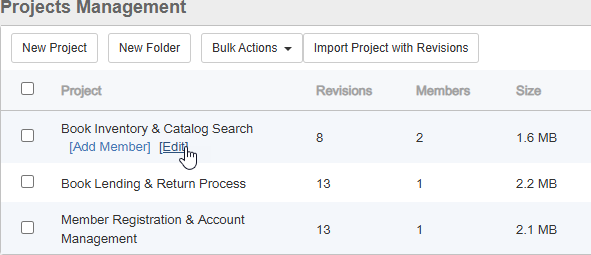
- Hover over the project where you want to enable QueryBase.
- Click Edit.
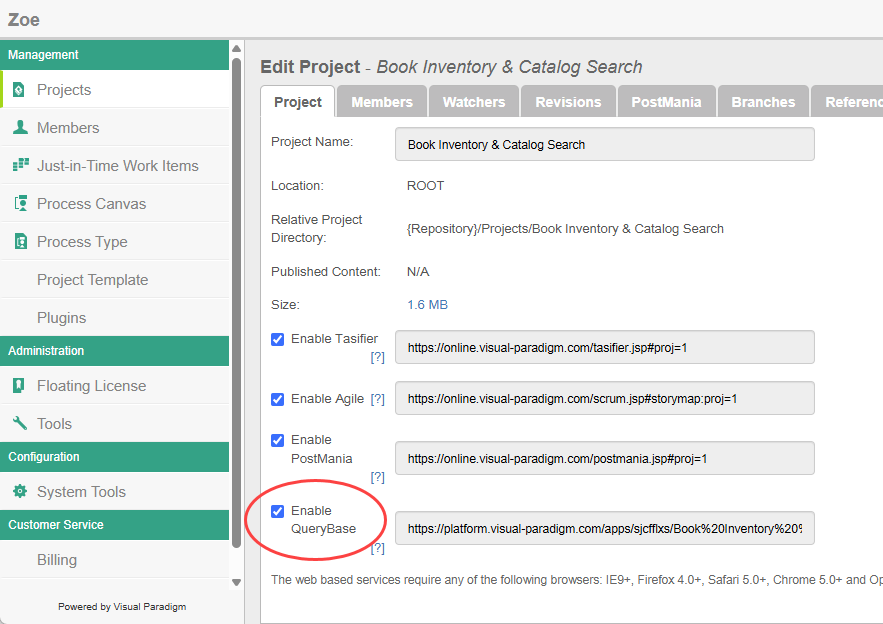
- Select Enable QueryBase.
- Click Save at the top right.
- You can copy the URL next to [/] Enable QueryBase, and visit the URL to open the Project Explorer.
Accessing the different tools
To navigate among the various tools of QueryBase (Project Explorer, Model Queries, Hierarchical Queries), click on the Tools menu at the top right of any tool, and then select the tool to open.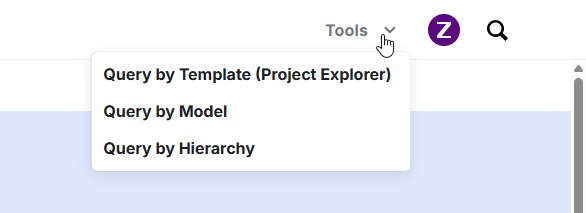
Data Synchronization Summary
| Layer | Primary Role | Data Handling |
|---|---|---|
| Visual Paradigm Desktop | Model Creation & Editing | Generates visual models, relationships, and property configurations. |
| Cloud Workspace | Centralized Repository | Stores and versions project metadata, diagrams, and permissions securely. |
| QueryBase | Data Mining & Output Pipeline | Queries, filters, traverses, and exports model metadata directly to JSON. |