The QueryBase Project Explorer transforms your cloud-stored Visual Paradigm models into an interactive, web-accessible database. It empowers reviewers, developers, and stakeholders to inspect system architecture, diagrams, shapes, and relationships directly from any modern web browser—with zero desktop software installation required.
What is the QueryBase Project Explorer?
Traditionally, viewing detailed model properties, custom tags, or interconnected shape relationships required opening a native modeling application like Visual Paradigm Desktop. Static exports (like PNGs or PDFs) lost the rich semantic metadata underlying the visual design. The QueryBase Project Explorer bridges this gap by rendering fully interactive, metadata-rich representations of your cloud projects on the web. It provides a lightweight, read-optimized interface for deep architectural inspection and conditional model searching.Key Web-Browsing Features
Designed for rapid discovery and effortless navigation, the Project Explorer includes several core features:🔍 Zero-Install Access
Open and inspect any project saved in your Visual Paradigm Cloud Workspace instantly using Chrome, Safari, Firefox, or Edge on any device.📍 Seamless Breadcrumb Navigation
Maintain spatial and logical context as you drill down into complex architectures. Jump effortlessly between the project root, specific diagrams, model elements, and associated properties.⚡ Conditional Model Search Engine
Locate specific shapes or elements across multi-diagram projects using targeted text, stereotype, or type filters. Click any search result to jump directly to that element within its diagram context.🔗 Dynamic Relationship & Property Inspection
Click any shape or line to view its underlying attributes, custom properties, tagged values, and incoming/outgoing connections in a dedicated inspector sidebar.Who Benefits from Web-Based Browsing?
| User Role | Primary Web-Browsing Use Case |
|---|---|
| Developers & Engineers | Inspect class models, API endpoint shapes, or DB schemas to inform implementation details without launching a heavy IDE/desktop suite. |
| Product Managers & BAs | Review business process flows (BPMN) and Use Cases alongside clients to verify business rules in real time. |
| QA & Security Testers | Verify model requirements, trace user actors, and audit system boundaries against functional specs. |
| External Stakeholders | Explore approved system design deliverables securely through read-only web access. |
Quick Start: How to Open a Project in Explorer
- Open your browser and log in to your Visual Paradigm Online account at: https://online.visual-paradigm.com/login.jsp
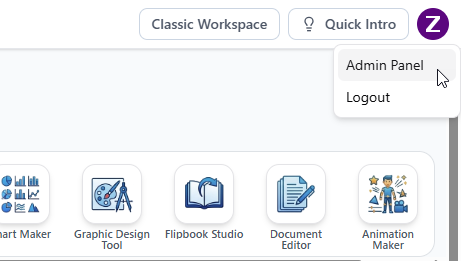
- You’ll be redirected to the Visual Paradigm Unified Platform. Click your logo at the top right corner and select Admin Pane.
- Click on the Projects menu on the left.
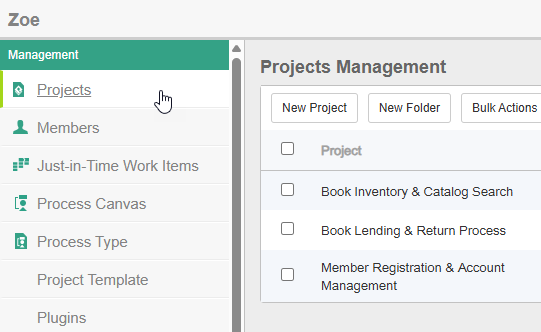
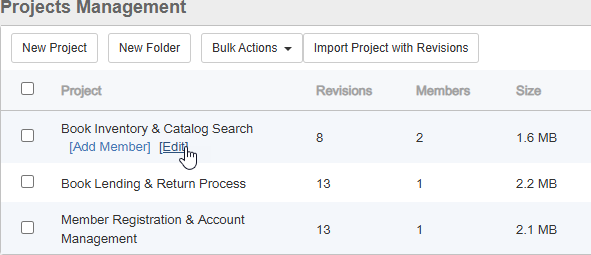
- Hover over the project where you want to enable QueryBase.
- Click Edit.
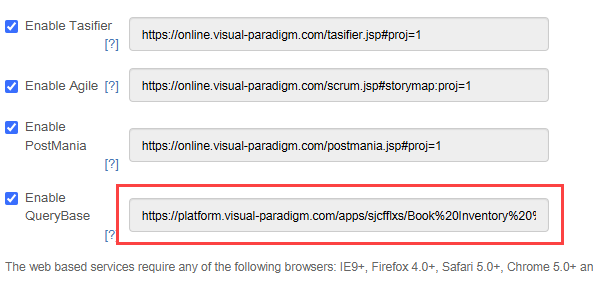
- In the Project tab, you can open the URL of QueryBase for this project. Visit the URL to start using QueryBase.