


Locating a single element, stereotype, or relationship within an enterprise-scale architecture can be challenging. The QueryBase Conditional Model Search engine lets you execute targeted search queries across your entire project repository and instantly navigate to matching elements within their visual diagram context.
Why Use Conditional Search in QueryBase?
In complex software models containing hundreds of diagrams and thousands of shapes, browsing package hierarchies manually is slow and inefficient. QueryBase solves this with a multi-attribute search mechanism that indexes every element, property, and relationship in real time. Instead of relying on simple keyword matching, Conditional Model Search lets you combine structural parameters—such as element type, assigned stereotypes, and custom property keys—to isolate precise subsets of your project data.Universal Element Querying (Advanced Search)
Universal Querying is the most powerful feature, enabling you to search for any element by its properties across all projects simultaneously, not just the one you are viewing.- To begin a search, click the Magnifier Icon (🔎) located in the top right corner of the application to open the dedicated Query Interface.

- From here, you can set your search condition. For example, configure the search to look at the Element Property: Name, select contains, and type your search term.
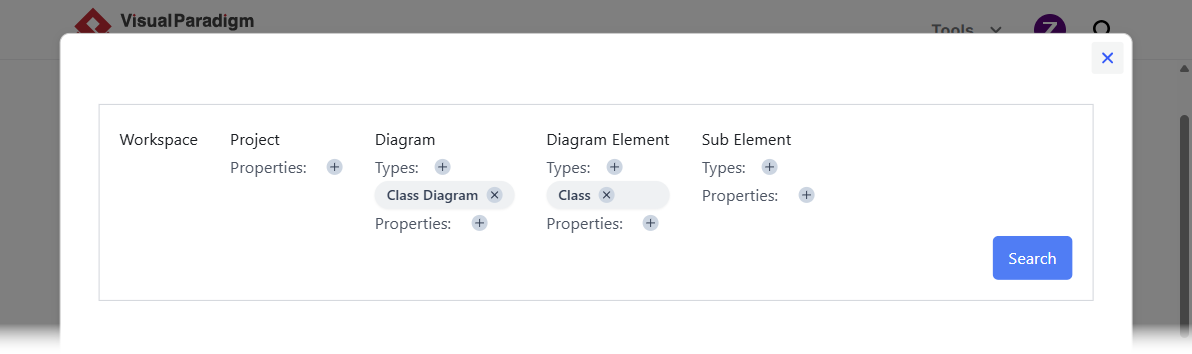
- Once your condition is set, click the Search button.
- The results will list all matching elements from every project in the workspace.
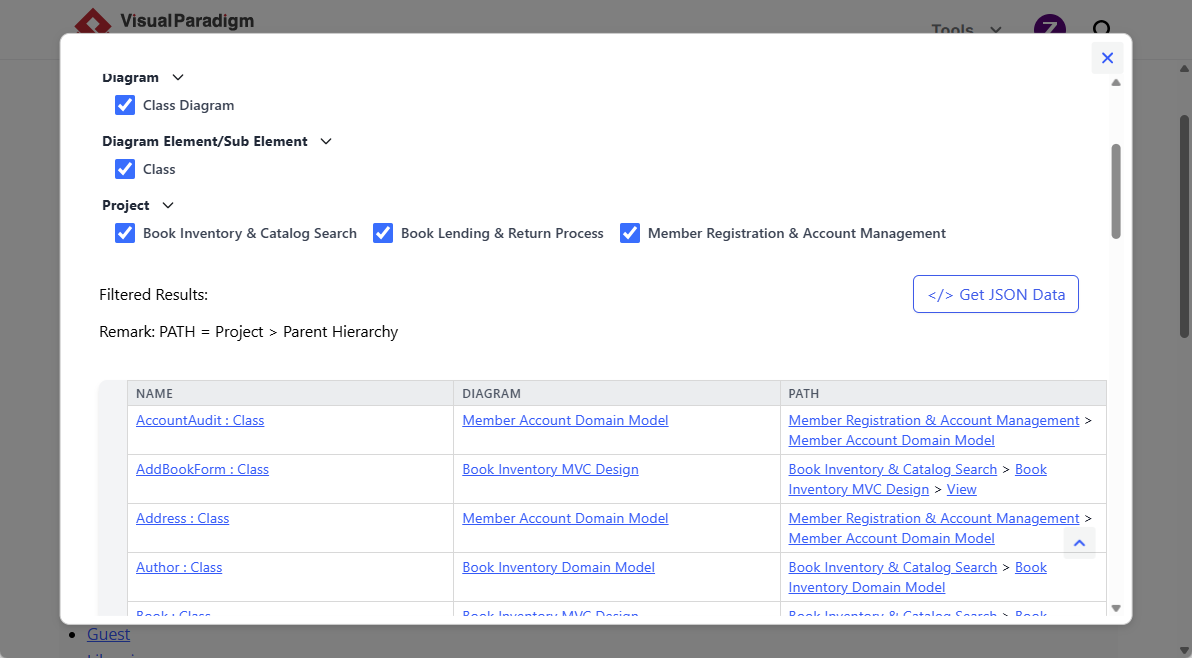
- To focus your results, use the Element Type Filter in the results panel; simply uncheck all types except the desired one to instantly narrow down the list.
Practical Search Scenarios
| User Goal | Search Configuration / Criteria | Result / Outcome |
|---|---|---|
| Audit Security Actors | Type: Actor | Name contains: "Admin" |
Lists all administrator actor shapes across all system Use Case diagrams. |
| Find Deprecated Services | Stereotype: «Deprecated» |
Locates all legacy components marked for refactoring or retirement. |
| Locate Database Tables | Type: Entity | Property: PrimaryKey=True |
Extracts primary key entity attributes from ERDs across the project. |
Search Efficiency Tips
- Combine Type + Keyword: Narrow large result sets quickly by specifying the model type alongside a text keyword.
- Use Stereotypes for Governance: Apply standardized stereotypes in Visual Paradigm Desktop to make governance and security audits effortless in QueryBase.
- Inspect Context Links: Use the direct jump feature to inspect how an element interacts with surrounding shapes before making architectural decisions.