


QueryBase Hierarchical Queries enable teams to extract rich architectural models from Visual Paradigm Cloud and convert them into structured, developer-friendly data formats. By organizing model data into a clean tree structure, QueryBase makes it effortless to analyze, transform, and integrate your modeling assets into external systems.
What is Hierarchical Model Extraction?
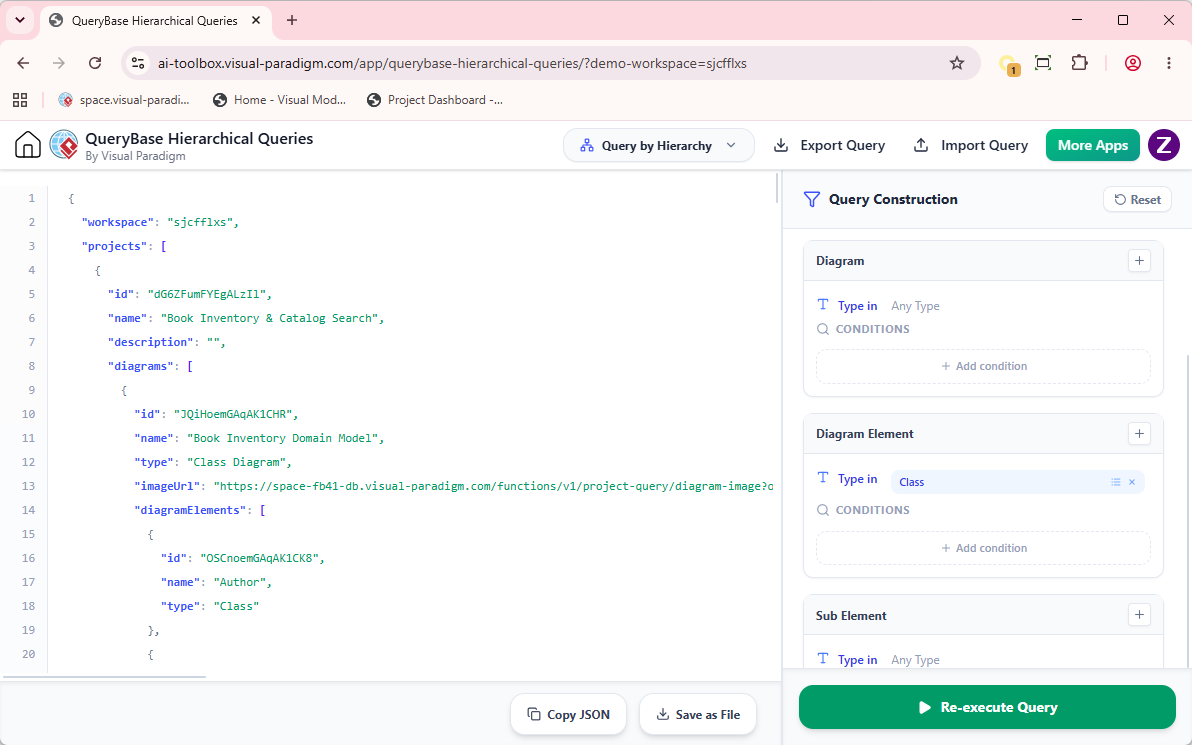 Visual models are inherently hierarchical. A system model contains multiple diagrams; diagrams contain shapes, entities, and connectors; and each shape possesses distinct properties such as names, stereotypes, custom tags, and documentation notes.
Hierarchical Model Extraction is QueryBase’s built-in engine for parsing these nested relationships and flattening them into structured JSON payloads. Instead of requiring manual data entry or complex custom API integrations, users can extract well-defined tree structures directly from their web browser.
Visual models are inherently hierarchical. A system model contains multiple diagrams; diagrams contain shapes, entities, and connectors; and each shape possesses distinct properties such as names, stereotypes, custom tags, and documentation notes.
Hierarchical Model Extraction is QueryBase’s built-in engine for parsing these nested relationships and flattening them into structured JSON payloads. Instead of requiring manual data entry or complex custom API integrations, users can extract well-defined tree structures directly from their web browser.
The Standard Extraction Structure
Hierarchical queries strictly enforce a logical multi-tier data model:Project > Diagram > Diagram Element > Properties
- Project Level: The top-level wrapper defining repository metadata, project name, version, and unique IDs.
- Diagram Level: Contains the subset of targeted diagrams (e.g., Use Case Diagrams, BPMN workflows, ERDs) filtered by your query criteria.
- Diagram Element Level: Lists all shapes, actors, classes, tasks, or connectors present within each diagram.
- Properties Level: Contains explicit metadata attributes chosen for inclusion, such as names, descriptions, stereotypes, and custom tagged values.
Example Structured JSON Output
Below is a simplified example of how QueryBase structures an extracted Use Case Diagram model into clean JSON:{
"workspace": "dshv9sdg",
"projects": [
{
"id": "PRJ-90210",
"name": "E-Commerce System",
"diagrams": [
{
"id": "DIAG-101",
"name": "Checkout Process",
"type": "UseCaseDiagram",
"imageUrl": "https://....",
"diagramElements": [
{
"id": "ELEM-001",
"name": "Customer",
"stereotypes": ["PrimaryActor"],
"description": "Registered user performing online purchases."
},
{
"id": "ELEM-002",
"name": "Process Payment",
"type": "UseCase",
"status": "Approved"
}
]
}
]
}
]
}Common Business & Engineering Use Cases
Structured hierarchical extraction turns static design artifacts into actionable data for downstream workflows:📄 Automated Documentation Generation
Feed structured JSON into static site generators or publishing tools (e.g., Hugo, Sphinx, Confluence) to maintain automated, living software documentation.⚙️ CI/CD & Code Generation Pipelines
Extract data models and class specifications directly into build scripts to automatically generate API interfaces, DTOs, database migrations, or configuration files.📊 Compliance & Governance Reporting
Extract properties, custom tags, and security levels into data analytics tools or Excel to run enterprise risk and regulatory compliance checks.Extraction Tier Overview
| Tier Level | Description | Typical Extracted JSON Attributes |
|---|---|---|
| Project | Root container in Cloud Workspace | id, name, author, lastModified |
| Diagram | Visual view or canvas container | id, name, type (e.g., BPMN, UML, ERD) |
| Diagram Element | Individual shape, model, or line | id, name, elementType (e.g., Class, Actor, Task) |
| Properties | Detailed attributes and tags | stereotype, documentation, customTags |